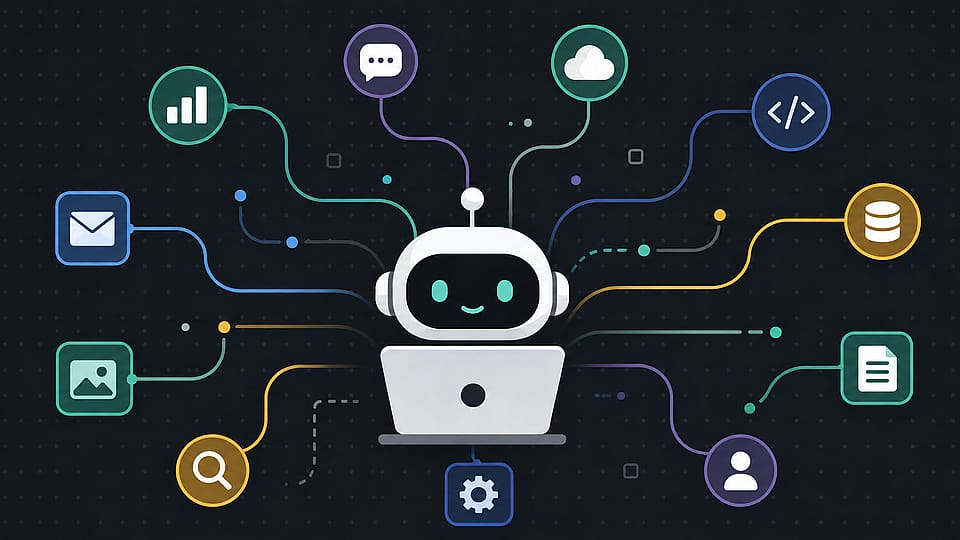
An Action Log API exposes a structured, chronological record of what happened to or around a user profile — logins, purchases, status changes, support interactions, and so on — as profile events. Clients consume these events in one of three ways: polling the API on a schedule, subscribing to webhooks that push events as they happen, or streaming events through a queue for high-volume systems. Once ingested, teams typically feed these events into analytics pipelines, marketing automation, fraud and compliance monitoring, customer support tooling, and internal audit trails — turning a raw activity log into the trigger layer for everything else a product does downstream.
What Is an Action Log API?
An Action Log API is an endpoint (or set of endpoints) that returns a record of discrete actions tied to an entity — most often a user or customer profile. Each entry in the log is a profile event: a timestamped fact that something happened, along with the context needed to understand it.
A typical profile event looks something like this:
{
  "event_id": "evt_8f2a1c9d",
  "profile_id": "usr_44210",
  "type": "subscription.upgraded",
  "timestamp": "2026-08-14T09:32:11Z",
  "properties": {
    "from_plan": "starter",
    "to_plan": "pro",
    "source": "billing_portal"
  }
}
The distinction that matters here is between an attribute and an event. An attribute describes something you know about a profile right now — plan tier, email address, signup date. An event describes something that happened at a specific point in time — a plan upgrade, a login, a failed payment. Action Log APIs are built around the second kind, and that time-anchored, append-only structure is what makes them useful for automation rather than just storage.
Why Clients Care About Profile Events
Static profile data tells you where a user stands. Event data tells you how they got there — and that history is what powers most of the workflows built on top of it:
- Sequencing matters. Knowing a user viewed pricing, then abandoned a cart, then contacted support tells a very different story than any one of those facts alone.
- Events are triggers, not just records. A
payment.failedevent can kick off a dunning workflow the moment it happens, rather than waiting for a nightly report to surface it. - They create an audit trail. For compliance-sensitive workflows, an immutable, timestamped log of what happened and when is often a requirement, not a nice-to-have.
Common Ways Clients Use Action Log Data
| Use Case | What Clients Do With It |
|---|---|
| Marketing automation | Trigger emails, in-app messages, or ads based on specific event sequences (e.g., send a win-back email after 14 days of inactivity) |
| Fraud & risk monitoring | Watch for anomalous event patterns — rapid location changes, repeated failed logins — and flag or block in real time |
| Customer support | Surface a full activity timeline inside a support tool so agents have context without asking the customer to repeat themselves |
| Product analytics | Feed events into a warehouse or BI tool to measure funnels, retention, and feature adoption |
| Compliance & audit | Maintain a tamper-evident record of account changes for regulatory or internal audit requirements |
| Internal automation | Chain events into internal workflows — provisioning resources when a plan upgrades, revoking access when an account is canceled |
Integration Patterns: Polling, Webhooks, and Streaming
How a client consumes the Action Log API usually comes down to how time-sensitive and high-volume their use case is.
1. Polling
The client calls the API on a schedule (GET /events?since=<cursor>) and processes whatever’s new since the last call. Simple to implement, works well for lower-volume or non-urgent use cases like nightly analytics syncs, but introduces latency equal to your polling interval and wastes calls when nothing has changed.
curl "https://api.example.com/v1/events?since=evt_8f2a1c8c&limit=100" \
  -H "Authorization: Bearer $API_KEY"
2. Webhooks
The client registers an endpoint, and the API pushes each event to it as it occurs. This is the standard pattern for real-time automation — fraud alerts, transactional messaging, instant provisioning — because it eliminates polling latency entirely. The tradeoff is operational: the client’s endpoint needs to be reliably available, handle retries, and verify payload signatures.
POST https://client-app.com/webhooks/action-log
{
  "event_id": "evt_8f2a1c9d",
  "type": "subscription.upgraded",
  "profile_id": "usr_44210",
  "timestamp": "2026-08-14T09:32:11Z"
}
3. Event Streaming
For high-volume clients, some Action Log APIs offer a streaming interface — piping events into a message queue (Kafka, SQS, or similar) that the client subscribes to. This scales better than webhooks under heavy load and gives the consumer more control over processing order, retries, and backpressure, at the cost of more infrastructure to run.
Designing for Reliable Consumption
A few patterns show up consistently in well-built Action Log integrations, regardless of which method a client uses:
- Idempotency keys. Every event should carry a unique
event_idso clients can safely de-duplicate if the same event is delivered twice — which happens more often than most teams expect, especially with webhook retries. - Cursor-based pagination. Rather than paging by offset, well-designed Action Log APIs let clients track a cursor (the ID or timestamp of the last event processed) so polling picks up exactly where it left off, even across restarts.
- Backfill support. Clients integrating for the first time need a way to pull historical events, not just new ones going forward — otherwise every new integration starts with a blank timeline.
- Schema stability. Event
typevalues andpropertiespayloads should be versioned or at least documented clearly, since downstream automations tend to pattern-match on exact field names and silently break when they shift. - Signature verification for webhooks. Clients should verify a signing secret on incoming webhook payloads to confirm events actually originated from the API and weren’t spoofed.
A Simple Example Workflow
To make this concrete, here’s how a typical client might wire a single event type into an internal workflow:
- A
payment.failedprofile event fires when a customer’s card is declined - The client’s webhook endpoint receives it and verifies the signature
- The event is matched against the client’s dunning workflow rules
- A retry email is scheduled for 24 hours later, and the customer’s account is flagged as
at_riskin the client’s own database - If a second
payment.failedevent arrives for the same profile within 7 days, the workflow escalates to a suspension notice instead of a retry
None of this logic lives in the Action Log API itself — the API’s job is just to deliver the event reliably and with enough context. The workflow logic is entirely the client’s to define.
Frequently Asked Questions
What’s the difference between an Action Log API and a generic audit log? They overlap heavily, but an Action Log API is typically designed for programmatic consumption and automation — structured events, webhooks, pagination — while a traditional audit log is often built primarily for human review or compliance export.
Should I use polling or webhooks for my integration? Webhooks are the better fit whenever timing matters — fraud detection, transactional workflows, real-time personalization. Polling is simpler to build and reasonable for lower-urgency use cases like periodic analytics syncs, where a few minutes or hours of delay doesn’t matter.
How long should clients expect events to be retained and queryable? This varies by provider, but it’s worth confirming upfront — some APIs retain a rolling window (say, 90 days) via the query endpoint while offering longer-term export or archive access separately.
Can profile events be used for compliance purposes? Yes, that’s one of the most common use cases, provided the log is immutable (events aren’t editable after the fact) and timestamps are reliable. Confirm these guarantees with your provider if compliance is a driving requirement.
What happens if my webhook endpoint goes down temporarily? Most well-built Action Log APIs retry failed webhook deliveries on a backoff schedule for some period before giving up. It’s still good practice to periodically reconcile via the polling endpoint as a safety net, in case any events are missed during downtime.